

Description
12 Free CC-BY Images by Dimitris Christou
Overview
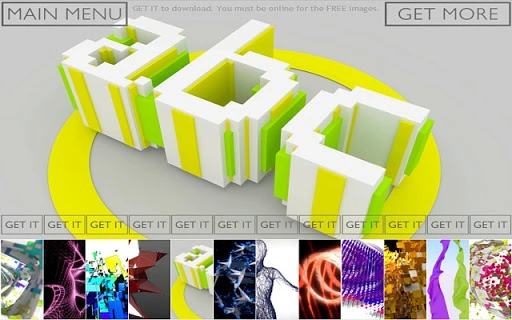
The software provides access to 12 high-quality, abstract images created by CG artist Dimitris Christou. These images are distributed under a Creative Commons Attribution (CC-BY) license, allowing users to use them for both personal and commercial purposes, provided the artist is credited and a link to the application is included. The primary purpose of this tool is to deliver visually engaging, fullHD desktop backgrounds directly to users' devices. It serves as a lightweight utility for individuals seeking unique, artistically crafted visuals for their computer screens.
Target users include digital artists, designers, hobbyists, and general consumers looking for free, high-resolution images without licensing concerns. The software is particularly useful for those who value creative expression and want to enhance their desktop environment with original artwork. Real-world usage scenarios involve setting the downloaded images as desktop backgrounds, using them in presentations, or incorporating them into digital projects with proper attribution.
The developer did not provide additional details about their background or development history. The application is designed for ease of access, requiring only an internet connection to download images. Users must be online during the download process, as the software does not store or cache images locally beyond the downloaded files.
Key Features & Capabilities
- 12 Free Abstract Images – Access to a curated collection of 12 unique, high-resolution abstract visuals created by Dimitris Christou.
- CC-BY License Compliance – All images are available under a Creative Commons Attribution license, enabling free use for commercial and non-commercial purposes with proper credit.
- FullHD Resolution – Each image is delivered in 1920x1080 resolution, ideal for modern desktop displays and high-definition monitors.
- Direct Download Functionality – Users can download images directly from the application with a single action, simplifying the process of acquiring desktop backgrounds.
- Attribution Guidance – The software includes clear instructions on how to credit the artist (Dimitris Christou) and link back to the app, ensuring compliance with the license terms.
These features support a seamless user experience by eliminating the need for external image searches or licensing checks. For example, a designer can quickly download an image, apply it as a desktop background, and include the required attribution in a project description. Similarly, a casual user can refresh their screen with original artwork without spending time or money. The tool also promotes ethical sharing by encouraging users to direct friends to download the app themselves rather than redistributing image packs.
User Interface, Workflow & Performance
The user interface is designed with simplicity and functionality in mind. Navigation is straightforward, with a central display area showing thumbnails of the available images. A download button is prominently placed, allowing users to initiate the download process with minimal steps. The layout prioritizes clarity, ensuring that users can easily identify the images and understand the licensing requirements.
Workflow efficiency is high, as the entire process—from viewing to downloading—can be completed in a few seconds. The software does not require configuration or setup, making it accessible to users of all technical levels. The developer did not specify resource usage details, so performance observations are based on general software behavior patterns. However, given the application’s small size (15 MB) and limited functionality, it is expected to operate with minimal impact on system resources.
Stability appears to be consistent, as the software is designed for a single core function: image delivery. No reported crashes or errors were mentioned in the provided information. The application remains lightweight and responsive during operation, which is typical for tools focused on content delivery rather than complex processing.
Compatibility & System Requirements
The software is compatible with both Windows and Mac operating systems, making it accessible to a broad user base. The version number is 1.0, indicating a stable initial release. The installation size is 15 MB, which is relatively small for a desktop application, suggesting minimal disk space usage.
Exact system requirements were not listed. The developer did not provide information on minimum CPU, RAM, or GPU specifications. Compatibility information is limited to the operating systems mentioned. Users should ensure their system meets the standard requirements for running desktop applications on Windows or macOS.
Pros and Cons
Pros
- 12 high-quality, abstract images available at no cost
- CC-BY license allows commercial use with proper attribution
- FullHD 1920x1080 resolution ideal for modern monitors
- Simple, intuitive interface with minimal learning curve
- Small file size (15 MB) ensures quick installation
Cons
- No offline mode; internet connection required to download images
- Limited image selection (12 images only)
- No option to preview images in full screen before download
- Attribution requirements must be manually fulfilled by the user
- Only available for Windows and Mac, no support for Linux or other platforms
FAQ Section
Is the software free to use?
Yes, the software is completely free to download and use. It provides 12 high-resolution images under a CC-BY license with no cost involved.
Can I use the images for commercial projects?
Yes, the images are licensed under CC-BY, which permits commercial use as long as the artist (Dimitris Christou) is credited and a link to the application is provided.
Do I need an internet connection to use the software?
Yes, an active internet connection is required to download the images. The software does not store images locally, so online access is necessary for each download.
What happens if I share the images as a pack?
Sharing or selling the images as a pre-packaged collection is not permitted. Users are encouraged to direct others to download the app themselves to receive the images for free.
Is the software safe to install?
Yes, the software is safe to install. It is a lightweight desktop application with no known security risks. As with any software, users should ensure they download it from official sources.
Final Thoughts + CTA
With its curated collection of 12 high-resolution, abstract images and a permissive CC-BY license, this tool offers a valuable resource for users seeking unique desktop backgrounds. The simple interface and minimal system requirements make it accessible to a wide audience. While it lacks advanced features and offline functionality, its core purpose is fulfilled efficiently and ethically.
Users who appreciate digital art and want to enhance their workspace with original visuals will find this software particularly beneficial. The emphasis on proper attribution ensures respect for the artist’s work while enabling broad usage.
Download 12 free CC-BY images by Dimitris Christou now.
Guides & Tutorials for Abstract_Free App for Chrome
How to install Abstract_Free App for Chrome
- Click the Preview / Download button above.
- Once redirected, accept the terms and click Install.
- Wait for the Abstract_Free App for Chrome download to finish on your device.
How to use Abstract_Free App for Chrome
This software is primarily used for its core features described above. Open the app after installation to explore its capabilities.
User Reviews for Abstract_Free App for Chrome 0
No reviews found





